Sale!

Disability & Charity Tax Exemption for WooCommerce

From: $59.00 / year

$59.00 / year
Original price was: $118.00.Current price is: $94.00. every 2 years
Clear

Manage tax exemptions directly at checkout

Disability  & Charity Tax Exemption for WooCommerce helps stores collect tax-exemption declarations, apply a configured zero-rate tax class, and keep the supporting information with each order.

Use the extension for disability and charity VAT relief or adapt its labels, instructions, and form fields for other VAT, GST, and zero-rate tax workflows. Customers can complete the declaration during checkout, while your team receives a consistent record for review, reporting, and administration.

  • Apply your configured zero-rate tax class to eligible products
  • Collect customer declarations and supporting information at checkout
  • Customize tax terminology, instructions, labels, and fields for your market
  • Store exemption details and signatures with the WooCommerce order
  • Review claim activity and export reports from WordPress
Version 3.0.6 improves stability and reliability and recalculates the checkout total immediately after the customer completes the exemption form.

Adapt the workflow to your tax system

The extension includes two configurable declaration pathways. They are set up for disability and charity VAT exemption by default, but you can customize the customer-facing labels, messages, field names, terms, and instructions to reflect your store’s tax-exemption process.

This flexibility can support stores working with VAT, GST, sales tax relief, or another tax system that uses a WooCommerce zero-rate tax class. The extension does not determine whether a customer or transaction is legally eligible. It applies the workflow and tax treatment you configure.

Tax rules and evidence requirements vary by country, region, product, and customer type. Review your configuration and declaration wording with a qualified tax professional before accepting tax-exempt orders.

Who is it for?

Disability VAT Exemption for WooCommerce is designed for merchants that need to collect a customer declaration before applying a zero-rate or tax-exempt treatment to eligible products.

It is particularly well suited to UK stores managing disability and charity VAT relief, while its customizable terminology, form fields, eligibility settings, and tax-class handling also make it suitable for exemption workflows in other countries.

  • UK stores offering disability VAT relief: Collect customer eligibility declarations, signatures, and supporting information at checkout.
  • Charities and nonprofit organizations: Manage charity declarations, optional expiry dates, claim statuses, and exemption records.
  • Stores selling to eligible charities: Apply a structured declaration process before zero-rating qualifying products.
  • B2B and wholesale stores: Provide tax-exemption workflows for approved customers, organizations, or user roles.
  • International VAT and GST merchants: Customize tax terminology, instructions, fields, and declaration wording for local requirements.
  • Stores with region-specific exemption programs: Control product eligibility, customer access, and form availability by country or user role.
  • Merchants that need stronger records: Keep declarations, signatures, claim statuses, downloadable documents, and reporting data connected to each WooCommerce order.

How it works

  1. Enable tax exemption for the products that qualify under your rules.
  2. The customer selects the applicable exemption option during checkout.
  3. The customer completes the declaration fields and signature option you have enabled.
  4. The extension applies your configured zero-rate tax class to eligible products.
  5. The checkout total is recalculated and the declaration is saved with the order.
  6. Your team can review, update, download, and report on the exemption claim.
Create and configure the required zero-rate tax class in WooCommerce before accepting exemption claims. Shipping tax treatment continues to follow your WooCommerce tax settings.

Control which products and customers can claim an exemption

Show the exemption workflow only where it is relevant to the order and your store’s policies.

  • Enable or disable tax exemption for individual products
  • Bulk enable or disable exemption across multiple products
  • Hide the exemption form for customers in selected countries
  • Control availability by WordPress user role
  • Override role-based behavior for an individual customer
  • Enable or disable the second declaration pathway when it is not required

Build a declaration form that fits your store

Customize the information displayed and collected at checkout without editing template files. You can keep the form concise or enable additional fields when your process requires more detailed records.

  • Customize exemption names, introductory messages, field labels, and terms
  • Add text, text area, number, date, select, checkbox, and radio fields
  • Create separate additional fields for each declaration pathway
  • Choose whether standard fields are optional or required
  • Show basic fields only or enable advanced address, date, and signature fields
  • Collect digital or text-based signatures, or disable signatures entirely
  • Adjust the form background, borders, spacing, headings, labels, and error styling

Support both classic checkout and Checkout Blocks

Customers can complete the exemption declaration through the classic WooCommerce checkout or Cart and Checkout Blocks. The extension uses the same core exemption data across both checkout experiences.

Recent releases have also improved the accessibility and usability of exemption selection, conditional sections, required fields, validation messages, buttons, and signature controls.

Keep complete exemption records with each order

Declaration details are stored with the WooCommerce order, giving administrators a central record of the information supplied by the customer.

  • View exemption details from the WooCommerce order screen
  • Display declaration information in customer order views and order emails
  • Store digital or text-based signatures with the order
  • Track claims as pending, approved, expired, or rejected
  • Add an optional expiry date and send expiry reminders
  • Generate a downloadable PDF record of the completed declaration
  • Continue displaying supported exemption data from historical orders

Send configurable claim notifications

Keep administrators and customers informed throughout the exemption process with optional email notifications.

  • Notify an administrator when an exemption claim is submitted
  • Send status-related notifications to the customer
  • Customize notification subjects and message content
  • Insert order, customer, exemption type, and status information using placeholders
  • Optionally include the customer’s IP address in order emails

Monitor exemption activity with reports

Use the built-in reporting tools to understand exemption activity and prepare records for accounting, administration, or internal review.

  • View claim activity by day, week, or month
  • Compare pending, approved, expired, and rejected claims
  • Review geographical distribution using the order billing country
  • See exemption counts by product
  • Export claim, geographical, and product reports in CSV or PDF format

Work with modern WooCommerce stores

  • Compatible with High-Performance Order Storage
  • Supports classic checkout and Cart and Checkout Blocks
  • Integrates with WordPress personal data export and erasure tools
  • Uses consistent exemption data for new orders and supported legacy records
  • Provides extension points for custom code and related integrations

Use it for a range of exemption workflows

The extension can be configured for WooCommerce stores that need a customer declaration before applying zero-rate tax treatment, including:

  • Stores selling products that qualify for disability-related VAT relief
  • Charities, nonprofit organizations, and stores serving eligible charities
  • B2B stores working with approved tax-exempt customers or organizations
  • Merchants operating in VAT or GST jurisdictions with zero-rating programs
  • International stores that need localized tax labels and declaration wording
  • Stores that need an auditable exemption record connected to each order
Replace manual tax adjustments with a structured checkout declaration, consistent order records, claim management tools, and exportable reports.

Additional information

Billing option

1 Year, 2 Years

At Woocommerce.opmc.com.au, we want to ensure that you are 100% happy with your purchase.

  • If you have technical or sales queries, do not hesitate get in touch with us
  • If after you attempted to resolve issues with Support staff and feel the product(s) you purchased does/do not the best fit your requirements, we want to make things right.

Our policy offers a full refund within 30 days of your date of purchase. We’d love to know what went wrong and how we can improve, so please include details about the reason for your refund request if you reach out to us directly.

Woocommerce.opmc.com.au and our payment process submit the refund immediately and make every attempt to process the refund as quickly as possible. Your financial institution can take up to 20 days for the refund to reflect in your bank account/card.

The Disability VAT Exemption extension for WooCommerce allows customers and charities to declare themselves VAT Exempt in checkout.

Installation

  1. Download the .zip file from your WooCommerce account.
  2. Go toWordPress Admin > Plugins > Add New and Upload Plugin with the file you downloaded with Choose File.
  3. Install Now and Activate the extension.
More information at: Install and Activate Plugins/Extensions.

Settings

To configure the extension, go to: WooCommerce > Settings > Tax.
  • Require Disability and Charity fields? – by default the fields are optional. If this option is not checked, a customer can select the Disability VAT Exemption (or Charity VAT Exemption, if selected) checkbox and proceed with checkout, without entering a name or reason
  • Disability Introduction Message – adds a default disability message that automatically populates, and overwrites, the next field
  • Disability Message – Shown above the disability information fields on the checkout.
  • Show charity form? – When checked, enables Charity VAT Exemption as an additional option
  • Charity Introduction Message – adds a default charity message that automatically populates, and overwrites, the next field
  • Charity Message – Shown above the charity information fields on the checkout.
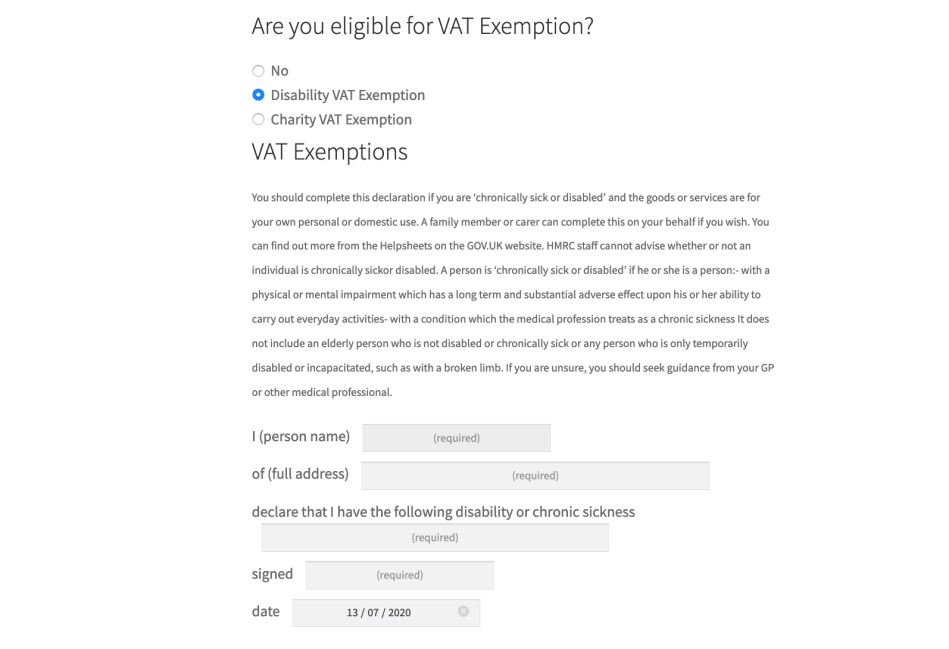
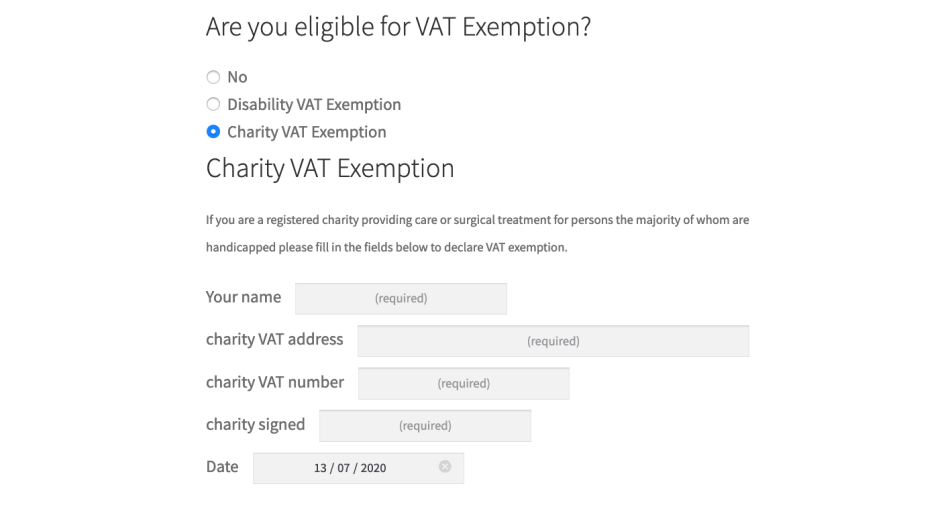
  • Show Advanced Fields? – When checked, ads additional fields for Disability VAT Exemption (person’s name, address, disability or chronic sickness details, signed, date) and Charity VAT Exemption (person’s name, charity VAT address, charity VAT number, charity signed, date).
  • Show IP address on email? – records and prints the IP address of the purchaser, in order-related emails.

Usage

Administration

To add the Disability VAT Exemption to your products, select “Disability VAT exemption” in the Product Data box under the General tab.
Disability VAT Exemption checkbox visible on the General tab of Product data

Prices

Prices are automatically displayed without tax if an eligible user is logged in.

Checkout Page

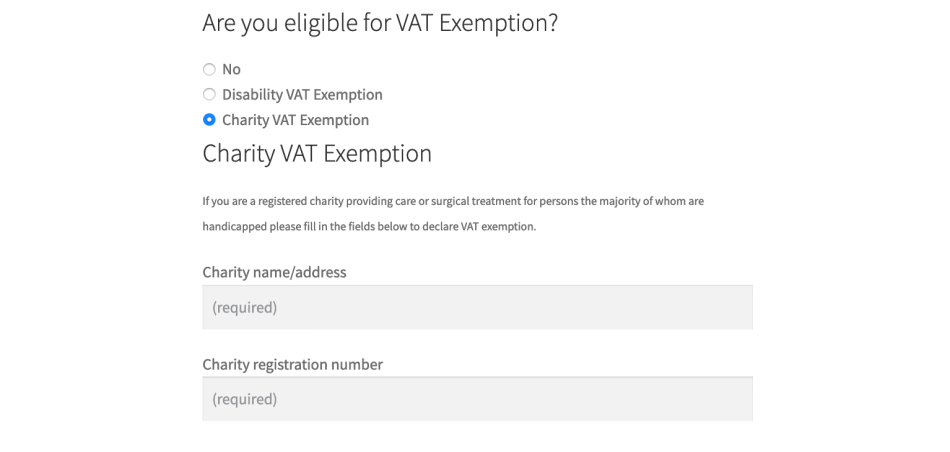
On checkout, a form is shown for disability reason and/or charity name and registration number, and will vary depending on the options selected in the Settings, as explained above:
Disability VAT Exemption with default fields
Disability VAT Exemption with advanced fields
Charity VAT Exemption with default fields
Charity VAT Exemption with advanced fields
After inputting either a disability reason, or a charity name and number, items are taxed at your zero rate. You must have a zero-rate tax class setup in WooCommerce > Settings > Taxes for this to work. Reasons and other input are stored in the order’s custom fields, and also shown in order emails.
  1. Download the .zip file
  2. Go toWordPress Admin > Plugins > Add New and Upload Plugin with the file you downloaded with Choose File.
  3. Install Now and Activate the extension.
Disability & Charity Tax Exemption thumb
Disability & Charity Tax Exemption for WooCommerce
From: $59.00 / year